Free Download AlDente for macOS latest standalone offline installer from SoftsCR. AlDente is a powerful and user-friendly utility designed to help MacBook users maintain and extend their battery health. With its smart charging management features and simple interface, you can easily control how your MacBook charges, preventing unnecessary battery wear and improving long-term performance.
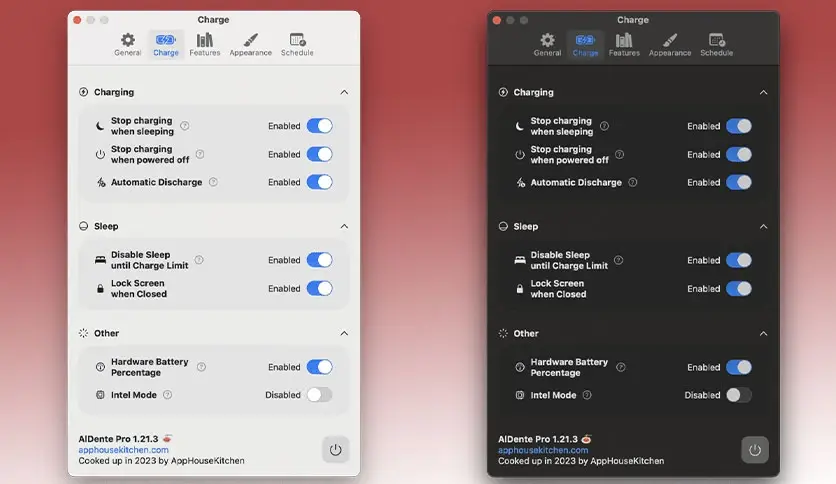
Overview of AlDente for macOS
Modern MacBooks use Lithium-ion (Li-ion) batteries, which perform best when their charge level stays between 20% and 80%. Keeping your MacBook constantly plugged in and charging to 100% can reduce the battery’s lifespan over time.
AlDente for macOS helps solve this problem by allowing you to control and optimize your MacBook’s charging behavior. With features like charge limits, temperature protection, and calibration tools, AlDente ensures your battery remains within a healthy charging range, ultimately extending its lifespan and maintaining peak performance.
Key Features of AlDente for macOS
Charge Limiter
The Charge Limiter allows you to set a maximum charging percentage for your MacBook. By preventing the battery from charging above a selected limit, you can significantly reduce battery wear and improve long-term battery health.
Discharge Mode
With Discharge Mode, your MacBook can run directly on battery power even while plugged in. This allows the battery to naturally discharge to a healthier percentage without unplugging the charger.
Heat Protection
High battery temperatures during charging can cause faster battery degradation. When Heat Protection is enabled, AlDente automatically pauses charging if the battery temperature rises too high.
Calibration Mode
Battery calibration can become inaccurate if your MacBook stays between 20% and 70% for long periods. Calibration Mode automatically performs a full cycle (15% → 100%) once a month to keep battery readings accurate.
Sailing Mode
Normally, macOS slightly charges and discharges the battery to maintain a fixed percentage. Sailing Mode lets you set a charging range.
For example:
- Battery charges up to 80%
- Then naturally drops to 75%
- Once it reaches 75%, it charges again to 80%
This cycle helps keep the battery in its healthiest range.
Accurate Hardware Battery Percentage
Instead of relying on macOS estimates, AlDente displays the real hardware battery percentage reported by the battery management system.
Automatic Discharge
When your current battery percentage exceeds the set charge limit, Automatic Discharge will gradually bring the battery level down to the desired limit.
TOP UP Feature
Planning a long trip or working session without access to power? With TOP UP, you can temporarily charge your MacBook battery to 100% when needed.
Apple Shortcuts Integration
AlDente supports Apple Shortcuts, allowing you to automate charging behavior and customize how the app works according to your workflow.
MagSafe LED Control
AlDente Pro allows you to control the color of the MagSafe LED, helping you instantly recognize the charging status of your MacBook.
Stop Charging While Sleeping
When Stop Charging When Sleeping is enabled, AlDente pauses charging before your MacBook enters sleep mode, preventing unnecessary charging cycles.
Right-Click Charging Control
Quickly pause or resume charging directly from the menu bar icon using a simple right-click.
Discharge in Clamshell Mode
AlDente Pro also supports Discharge Mode in Clamshell Mode, allowing your MacBook to discharge even when the lid is closed and connected to an external monitor.
Download AIDente MacOS free from SoftsCR
Live Status Icons
The menu bar icons provide real-time battery status, showing whether the MacBook is:
- Connected and Charging
- Connected but Charging Paused
- Connected and Discharging
- Running on Battery
Technical Details
Software Name: AlDente for macOS
Developer: AppHouseKitchen
License: Free / Pro Available
Supported OS: macOS 10.12 or later
Category: Battery Optimization Utility
Frequently Asked Questions (FAQs)
How does AlDente help extend battery life?
AlDente prevents constant 100% charging by letting you set custom charge limits and optimized charging cycles. This helps reduce battery wear and extends the overall lifespan of your MacBook battery.
Does AlDente use many system resources?
No. AlDente is a lightweight application designed to run efficiently in the background without affecting system performance.
Can I receive notifications from AlDente?
Yes. You can configure alerts to remind you when to unplug the charger or adjust your charging limits.